Campaign Influence QA Checklist: 12 Failure Tests Before You Trust the Dashboard
June 23, 2026
Opportunity Contact Roles: The Quiet Dependency Behind Reliable Attribution
August 2, 2026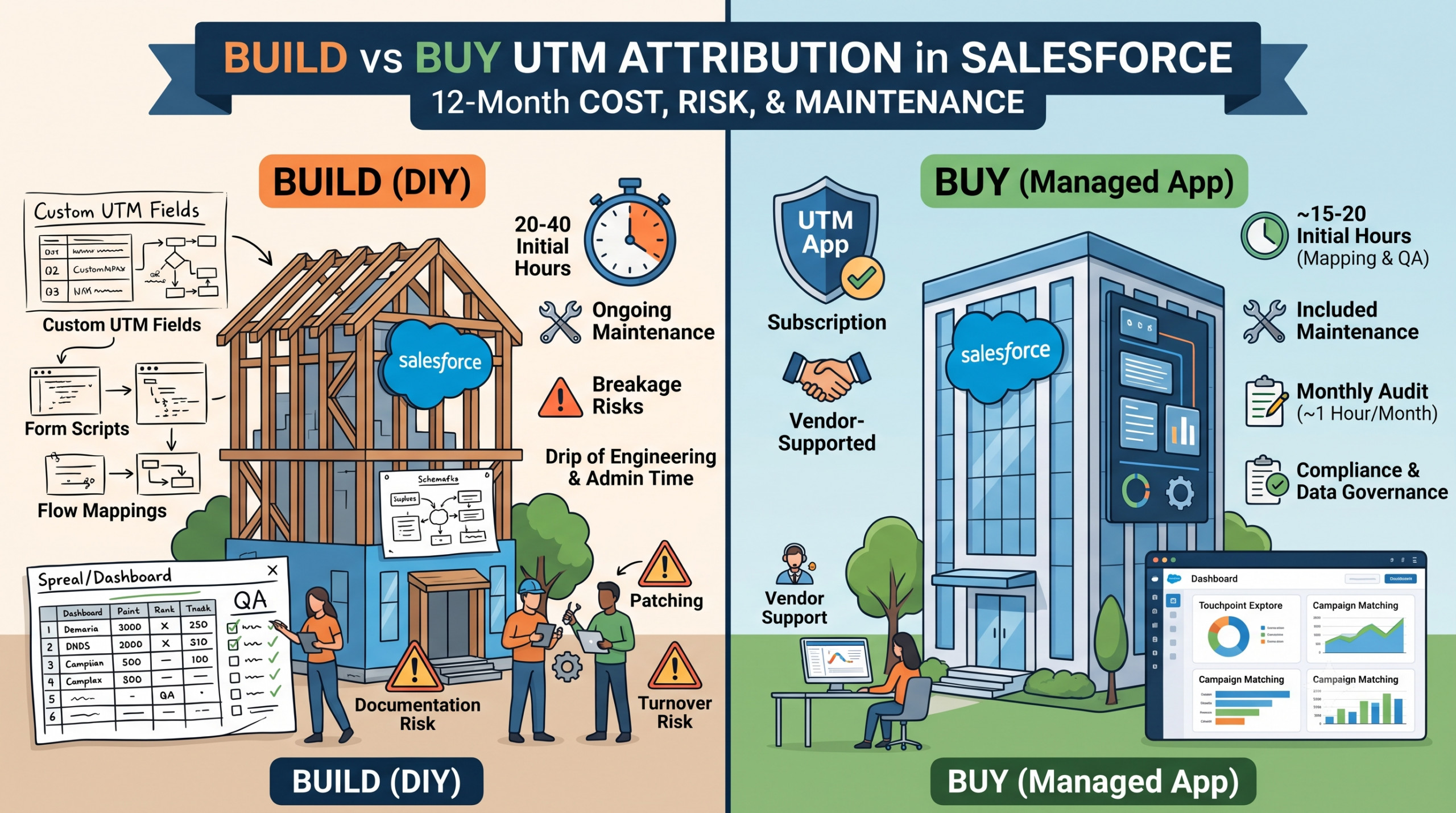
Build vs Buy UTM Attribution in Salesforce: Cost, Risk, and Maintenance at 12 Months
"We'll just build it with hidden fields" is a reasonable sentence in month one. Someone stamps UTM values into a few fields, an admin adds them to the Lead and Contact layouts, and a dashboard shows channel data within a week. No procurement, no line item.
What rarely gets budgeted is what the same setup costs by month twelve. DIY attribution doesn't have one price tag; it's a drip of engineering time, admin time, QA time, and report credibility, none of which shows up on an invoice because there is no invoice. This post isn't an argument that DIY is wrong. It's a framework for pricing it honestly, so "build" and "buy" get compared on the same basis instead of a real cost against an invisible one.
The DIY Plan Most Teams Start With
The pattern is familiar: hidden fields capture utm_source, utm_medium, utm_campaign, and sometimes utm_content/utm_term; a JavaScript snippet reads the URL and populates them before submission; a flow maps values onto Leads and Contacts and sometimes a CampaignMember; a few reports roll it up into channel performance.
This is genuinely fine for first-touch or latest-touch capture on form-driven leads, in a stable environment, before anyone is asking hard questions about mid-funnel influence. The plan isn't the problem... the problem is that most teams don't budget for what happens when it meets a real org for a year.
Hidden Cost Categories
None of these show up as a single line item, which is exactly why they get underestimated:
- Maintenance: every new landing page, microsite, or third-party form is a place the capture script has to be re-verified, and the maintenance surface grows independent of any roadmap.
- Breakage: cookie handling, cross-domain rules, and ad-blocker behavior shift periodically, and DIY capture degrades quietly. Nobody gets an alert; someone eventually notices a channel looks wrong.
- QA time: with no vendor SLA, someone on your team is the QA layer: auditing submissions, checking for null captures, reconciling unmatched values by hand.
- Institutional knowledge: the person who built it eventually leaves, and unless the logic is documented beyond "it's the fields on the layout," the next person inherits something they have to reverse-engineer.
- Opportunity cost: hours spent patching capture logic are hours not spent on segmentation or strategy. It never shows up as a ticket; it just caps how much time goes to analysis instead of upkeep.
Risk Categories
Cost is the recurring drip; risk is the larger, less frequent event a cost accounting won't capture:
- Compliance and data governance: undocumented scripts reading cookies and URL parameters are exactly what a privacy or security review flags. Fixing it retroactively costs far more than building it in from the start.
- Team turnover: DIY systems are usually undocumented in proportion to how fast they were built. When the builder leaves, "we'll fix it eventually" tends to become "we're rebuilding it from scratch."
- Sandbox refresh and org changes: a refresh can silently overwrite fields or automation tied to UTM capture if it isn't cleanly packaged, and the gap often surfaces weeks later.
- Platform migration: field-based capture tied to one platform's forms typically doesn't travel with a HubSpot or MCAE migration, and history gets flattened right when continuity matters most.
- Silent data quality decay: capture rates and taxonomy drift a little at a time, and nobody notices until a report is publicly wrong in front of leadership.
A 12-Month TCO Example
| Cost Category | DIY (Annual Estimate) | Managed App (Annual Estimate) |
|---|---|---|
| Initial build | 20-40 hours (dev + admin time) | ~15-20 hours (3-6 hrs CRM team: install, permissions, business unit registration; 10-15 hrs marketing team: campaign mapping/creation, initial QA) |
| Ongoing maintenance | 2-4 hours/month (new forms, breakage) | Included |
| QA and reconciliation | 2-3 hours/month | Monthly unmatched-campaign audit (~1 hour/month) |
| Incident response | Unplanned, 4-10 hrs/incident, 1-3/year | Vendor-supported |
| Subscription cost | $0 | UTM App: $3,000/year (or $300/month) |
| Documentation/turnover risk | High, informal | Low, vendor-maintained |
At a loaded rate of $60-$100/hour, the maintenance and QA lines alone run roughly $2,900-$4,800 a year before the initial build or any incident. A "free" DIY approach lands in the same rough cost range as a subscription once labor is priced honestly, before the risk categories even enter the picture.
Buying isn't a lift-to-zero switch either: a managed touchpoint model trades a few hidden fields for a fuller data model (a few dozen custom fields, a handful of custom objects, a scheduled API footprint), and someone still has to create and map campaigns and run that monthly unmatched-campaign audit. The difference from DIY isn't zero maintenance... it's maintenance that stays inside an auditable workflow instead of degrading silently inside custom code.
A Decision Framework by Org Maturity and Budget
A rough filter, not a rigid rule:
- Early-stage, single channel, low form volume: DIY is usually fine; the team that built it is the team maintaining it.
- Growing team, multiple channels and form owners: hidden costs compound fastest here, since more people can create forms than can maintain the tracking behind them. See the tipping points in Hidden Fields vs Salesforce UTM Touchpoints.
- Established team, leadership reporting, compliance exposure: risk now outweighs cost; one bad board number or turnover event dwarfs a subscription fee.
- Multi-business-unit or multi-platform: coordinating DIY consistency by hand across orgs usually costs more than one managed configuration.
Choosing DIY deliberately is a legitimate outcome. If that's where you land:
- Document the capture logic outside the code itself: fields, triggers, mapping rules, and why.
- Name an owner, not just a builder, accountable for noticing drift.
- Package what you can: flows and fields in a package survive sandbox refreshes far better than ad hoc metadata.
- Run a recurring QA pass: a monthly spot-check of unmatched values and null captures catches drift early.
- Write the migration plan before you need it, if a platform change is even plausible in the next two years.
Where the UTM App Fits
The UTM Capture and Reporting App moves the categories above from recurring internal cost to vendor-maintained: touchpoint capture, campaign matching, and unmatched-value handling are built in, so most of the maintenance and QA hours in the table are absorbed rather than staffed. That doesn't make "buy" right for every org in the framework above... but the comparison should use two real numbers, not one real number against an invisible one.
DIY UTM tracking is rarely a bad decision on day one. It becomes one only when nobody revisits the math as the org grows.
If you want a practical next step, total up the hours your team spent last quarter on UTM maintenance, breakage, and reconciliation, and price it at your team's loaded rate. That's the real cost of "free" and if it's higher than expected, a 30-day UTM App trial is a low-risk way to see the other side of the comparison against your own data