Build vs Buy UTM Attribution in Salesforce: Cost, Risk, and Maintenance at 12 Months
July 5, 2026
Opportunity Contact Roles: The Quiet Dependency Behind Reliable Attribution
Your webinar did well. Three people from the same Account registered, one of them grabbed the comparison guide afterward, and two of them showed up to the demo a few weeks later.
Then the deal closes, you open your influence report, and the webinar gets credit for none of it.
The campaign data is fine. The CampaignMembers are all there. The problem is that the Opportunity has exactly one Contact Role, created by a lead conversion nine months ago, and it belongs to someone who stopped replying to email back in March.
Opportunity Contact Roles are probably the least interesting object in the whole attribution stack. They are also the one that quietly decides whether your influence reporting is worth presenting. Usually they are owned by Sales, measured by nobody, and invisible in every dashboard that depends on them.
We keep running into this when helping teams troubleshoot Campaign Influence, so let's talk about it.
Why OCRs Control What You Can See
Campaign Influence connects marketing engagement to revenue along one path:
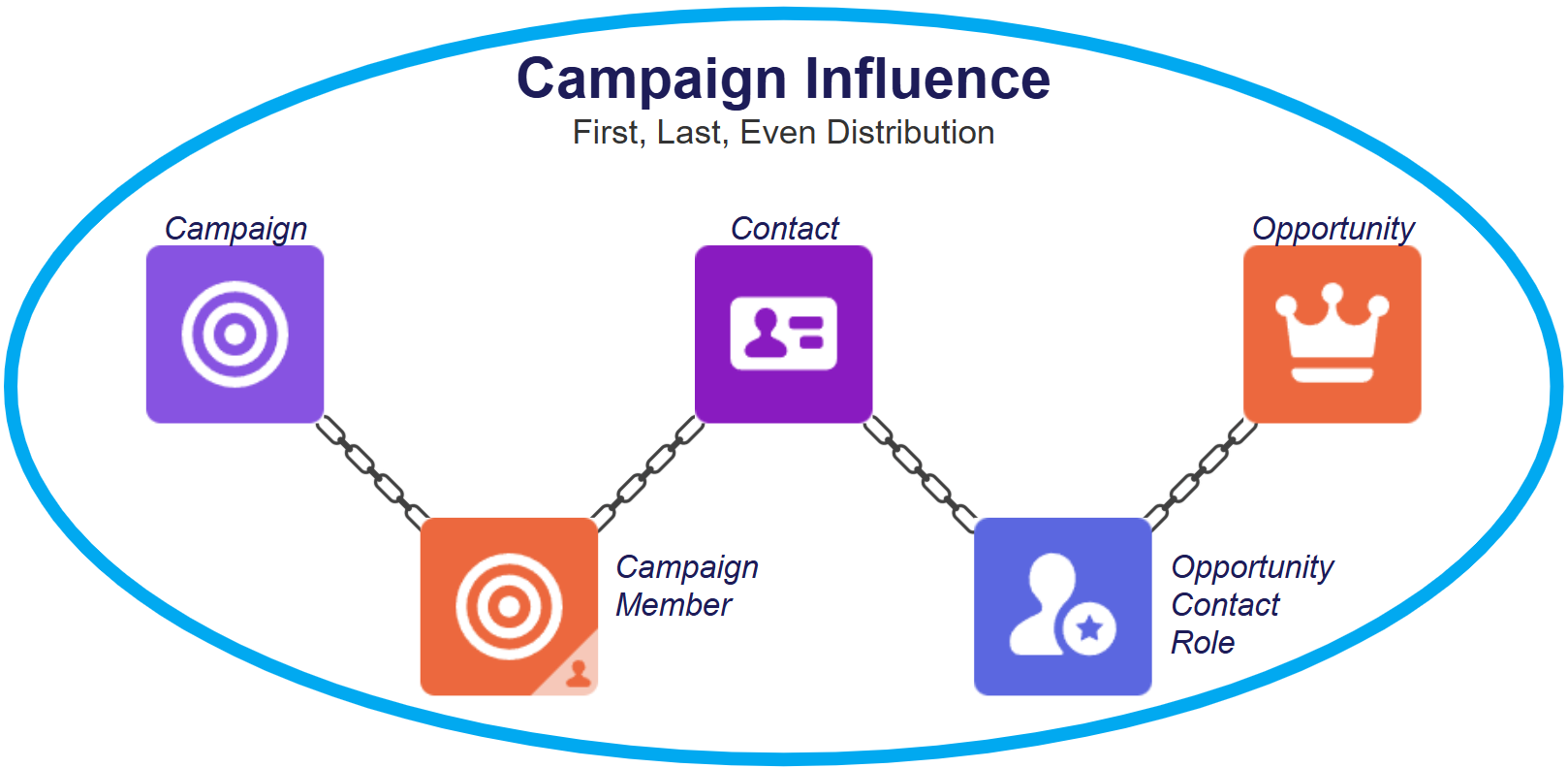
I wrote about this chain in a Salesforce Ben post on UTM tracking last year, and the part worth repeating is that Campaigns, Contacts, and Opportunities are rarely where things break. It's the junction objects that get you. CampaignMember usually gets handled by your marketing automation platform. OpportunityContactRole gets handled by… well, hopefully somebody.
Here's what makes it different from every other link in that chain. If a campaign is mistagged, the influence lands on the wrong campaign but it still lands. If a CampaignMember is created late, at least the record exists and you can go audit it. If the Contact Role is missing, the Opportunity simply cannot be reached. No partial credit, no error message, no warning on the dashboard. The number just comes out smaller and everything renders beautifully.
Three things follow from that, and they're worth sitting with for a second.
Missing Contact Roles don't understate marketing evenly. They understate it wherever the hygiene is worst, and that is almost never spread neatly across teams, regions, or deal types.
Thin Contact Roles bend your channel ranking. If a deal carries one Contact Role and that person originally came in through paid search, then paid search takes credit for a deal that six people influenced. The number isn't just too small. It's pointing at the wrong channel, which is worse, because you'll act on it.
And lead conversion hides all of this. When a Lead converts and creates an Opportunity in the same step, Salesforce attaches that Contact as a Contact Role for you. So your net-new inbound deals look healthy while sales-created, expansion, and renewal Opportunities sit empty. If your reporting leans on inbound, you can run this way for years and never notice.
That last one is why OCR coverage is almost never uniformly bad. It's bad in one slice of the pipeline, and the org-wide average is very good at hiding it.
So which slice is it in your org? Expansion deals? One region? Everything a particular team touches?
The Failure Patterns We See Most
Most orgs have three or four of these running at the same time.
- Sales-created Opportunities with zero roles. A rep opens the Opportunity from the Account instead of converting a Lead, nothing requires a Contact Role, so none exists. This is the biggest single source of coverage gaps we run into, and it hits expansion and enterprise deals hardest. Which is to say, the big ones.
- Single-threaded deals. One role per Opportunity, usually whoever filled out the form or whoever the rep talks to most. Gartner's often-quoted number puts a B2B buying group at six to ten people. If your pipeline averages 1.1 Contact Roles per deal, that isn't describing your buyers. It's describing your data entry.
- Roles added at the finish line. Deal desk or CPQ needs a contact for the quote, so the Contact Role gets created a week before close. Great for paperwork. Useless for attribution, because the campaign touches that actually mattered happened months earlier.
- Cloned Opportunities. Renewals and expansions cloned from a prior deal don't bring Contact Roles along. The clone looks complete in every other way, which is exactly why nobody checks it.
- Blank or meaningless role values. The Contact Role exists but the Role picklist is empty, or every single record says "Decision Maker" because it's first in the list. Your coverage numbers look fine and you still can't segment anything.
- The wrong person is on the record. The converted Lead was a researcher or a gatekeeper. They're on that Opportunity forever, while the person who actually signed off never gets added. Coverage passes. The attribution is still wrong.
Go Get Your Baseline First
Before changing anything, find out how bad it actually is. This takes about twenty minutes.
The fastest path is one we already built. Our free Campaign Influence Accelerator includes a Troubleshooting dashboard that gives you these counts out of the box: Opportunities with Contact Roles versus without, Opportunities with influence versus without, and the matching split for Campaigns and their Members. Install it and you have a baseline before you've built a single report.
Be ready for what it shows you, though. Seeing a couple dozen Opportunities with Contact Roles sitting next to several hundred without them is a very normal first result, and that gap is the entire subject of this post.
One setup note, since it trips people up: most install failures come from the installing user not having the "Campaign Influence" permission, which blocks any metadata that references it. Sort that first and it installs cleanly.
If you'd rather build it yourself, it's not complicated either. Make a report on the Opportunities with Contact Roles report type and add a cross filter for Opportunities without Contact Roles to flip it around. Then group by stage, owner, record type, and created month. The grouping is the whole point. A single org-wide percentage tells you almost nothing, but the distribution tells you exactly where the process broke.
If you're comfortable in the Developer Console, start with the Opportunities that have no Contact Role at all:
SELECT Id, Account.Name, Name, StageName, Amount, CloseDate, Owner.Name, CreatedDate
FROM Opportunity
WHERE CreatedDate = LAST_N_DAYS:180
AND Id NOT IN (SELECT OpportunityId FROM OpportunityContactRole)
ORDER BY Amount DESC
Sort by Amount rather than date, on purpose. If the gap lives in your small deals, it's an annoyance. If your largest Opportunities are sitting at the top of that list, then every revenue number your influence dashboard produces is understated in the place it matters most.
Then look at how thin the covered deals are:
SELECT OpportunityId, COUNT(Id) roleCount
FROM OpportunityContactRole
WHERE Opportunity.CreatedDate = LAST_N_DAYS:180
GROUP BY OpportunityId
HAVING COUNT(Id) = 1
Change that HAVING to > 1 to see the healthy population, or drop it entirely for the full distribution. Those single-role Opportunities are the ones funneling all of their influence into whichever channel happened to touch one person.
There's no industry research I can point you at for what "good" looks like here, so these are just the numbers we look for before we'd be comfortable putting an influence report in front of leadership. Adjust them to your sales motion, and treat a bad number inside your large-deal segment as far more urgent than the same number org-wide.
- Closed-won Opportunities with at least one Contact Role: we want 95% or better. Under 70% and the report isn't ready to present.
- All open Opportunities with at least one Contact Role: 90% is good, under 60% needs work.
- Average Contact Roles per closed-won deal: 3 to 5 is healthy for a considered B2B purchase. Under 1.5 means single-threading.
- Contact Roles with the Role field actually populated: 90% or better, and anything under 50% means the picklist needs attention before the coverage does.
- Median days from Opportunity creation to first Contact Role: under a week is good, over 30 days and the roles are landing too late to help.
That last one gets skipped constantly, and it's the one attribution cares about most. Coverage measured at close date can look fantastic while every single role was created too late to fall inside your influence window.
Process Comes Before Automation
Automation can add Contact Roles. It cannot decide who belongs on a deal. Get that backwards and you'll automate the wrong roles at scale, which is a genuinely worse place to be than having none.
The first thing to know is that you can't write a validation rule against Contact Roles directly. Opportunity validation rules only reach fields on the Opportunity and its parent lookups, and OpportunityContactRole doesn't support roll-up summary fields either. So the standard workaround is two pieces:
- Add
Contact_Role_Count__candHas_Primary_Contact_Role__cto Opportunity. - Keep them current with record-triggered Flows on OpportunityContactRole.
You need an after-save Flow for create and update, and a before-delete Flow for the delete path. That delete path is the one most builds forget, and skipping it leaves Opportunities permanently passing a validation rule they should be failing.
Worth knowing that before-delete Flows are more capable than before-save Flows here. Before insert and before update only give you Get Records and only let you touch the triggering record, but before delete has all four data elements and can update the parent Opportunity just fine.
There is one trap on the delete side though. The Contact Role still exists while the before-delete Flow is running, so if you Get Records and count what comes back, you have just counted the record that's on its way out the door. Recalculate from the Contact Roles that will remain rather than trusting a stored number, and skip the increment/decrement approach entirely. A count that drifts once tends to stay drifted, and nobody goes looking for it.
Then gate the rule on a stage. Which stage? That choice matters more than the rule itself, so it's worth a minute of thought.
Gate at creation and it fails. Reps open Opportunities before they know the buying group, so you get one placeholder role added to shut the rule up and nothing after that, forever. Gate at close and you're too late for attribution, because the roles land after the campaign touches happened. Gate at the first stage that implies a real conversation, whatever yours is called, and you land in the right spot. The rep already knows who they're talking to, and the roles get created early enough to fall inside the influence window.
A few things that decide whether any of this actually holds:
- Trim the Role picklist to four to six real values. A fifteen-value picklist guarantees inconsistent data. Fewer, clearer roles give you something you can actually report on.
- Make it two clicks. Put the Contacts related list somewhere prominent. If adding a Contact Role means scrolling past six related lists, your coverage will track exactly how much scrolling your reps are willing to do.
- Sell it in Sales terms. "Marketing needs this for attribution" is not a reason a rep cares about. "The people you add here get invited to the executive dinner, and the ones you don't add won't" is.
- Watch for gaming. A rule requiring one Contact Role produces exactly one Contact Role. If you want multi-threading, report on your single-threaded deals instead of cranking the rule up to two and forcing people to invent a second name.
Automation Options, and What They Cost You
Once you know who belongs on a deal, automation closes the gap at scale. Two options cover most orgs.
The Simple Version: a Flow
An after-save record-triggered Flow on Opportunity that queries the Account's Contacts and creates the Contact Roles. Greenkey Digital's Opportunity Contact Role Flow covers the "add every Contact on the Account" version, including what to do when the Account changes. Automation Champion's Auto Add Opportunity Contact Role covers the criteria-based version, matching on title and assigning a specific role.
Three things to watch. Adding every Contact on the Account is blunt: forty Contacts means forty Contact Roles, and that Opportunity is now eligible for influence from every campaign any of them ever touched. That's the catch-all distortion coming in the back door. Duplicate protection is on you, so put a Get Records check ahead of the Create element if the Flow can fire twice. And it does nothing for the Opportunities already sitting in your org.
Flow is the right answer when your rule is genuinely simple and you want it running at creation.
The Evidence-Based Version: align.ly Contact Role
Align.ly Contact Role builds Contact Roles from things already on record: Tasks, Events, and Campaign Members logged against the Contact. Rules take criteria on all three sides, assign a role per rule with priority ordering, run scheduled or manually so you can backfill history, and log what got created and which rule fired. It's free on the AppExchange, 100% native, no usage caps.
That log is the part I'd care about most. When a sales leader challenges a Contact Role, "she attended the March webinar and we logged the follow-up call" holds up. "He works at that Account" does not.
Two caveats worth knowing. It inherits your activity logging, and Einstein Activity Capture stores emails and events outside standard Task and Event records, so that activity shows on the timeline but isn't queryable. On EAC, lean on the Campaign Member rules and check what the rules actually find. Second, backfilling doesn't rewrite history. Records created today carry today's CreatedDate, and auto-association recalculates open Opportunities but won't rebuild influence on ones that already closed. Your open pipeline improves. Last year's closed-won doesn't.
Either way, start narrow and run it manually first. Any rule loose enough to catch everything also catches the support contact who attended one webinar.
And no, there's no real native option beyond lead conversion. That's the whole reason this gap is so common.
Watch It So It Doesn't Come Back
A one-time cleanup regresses. What actually holds is a dashboard somebody looks at every month, with a name attached to it.
The components worth building are your working list of Opportunities with no Contact Role (grouped by stage, owner, and record type, not just counted), your average Contact Roles per Opportunity trended by created month, and your single-threaded closed-won deals. That last one is useful to marketing for attribution and useful to sales leadership as a risk metric, which makes it the easiest one to get executive attention on.
Then add the quality gaps that coverage counts hide: Opportunities missing a primary Contact Role, and Contact Roles with a blank Role value. Add median days from Opportunity creation to first Contact Role so you can see whether roles are landing inside the influence window. And add Campaign Members with no Contact Role anywhere, which is the marketing-side view of the same problem. The SOQL for that one is Test 2 in our Campaign Influence QA checklist.
If you installed the Troubleshooting dashboard back at the baseline step, you already have the coverage counts. What it won't give you is the segmentation and the trend, and those are what turn a number into an action. Knowing you have 400 Opportunities without Contact Roles is interesting. Knowing that 380 of them belong to one team, or that the count has doubled since you shipped the validation rule, is something you can actually do something about.
The Accelerator is an unmanaged package of editable reports and dashboards, so build the grouped and trended versions on top of it rather than starting over.
A Two-Week Plan to Move the Numbers
Two weeks is enough here, because most of this is decisions rather than build work.
Week one is measurement and design. Get your baseline on those benchmark metrics, segmented by stage, owner, and record type. Find where the gap concentrates, because it's usually one or two slices doing most of the damage. Then decide who actually counts as a Contact Role in your business and trim that Role picklist down to four to six values. Finish the week building Contact_Role_Count__c, Has_Primary_Contact_Role__c, and the OpportunityContactRole Flows, including the before-delete one.
Week two is rollout. Ship the validation rule to a single team first, along with the enablement conversation. The objections you hear from one pilot group in week two are a lot cheaper than the ones you hear from the whole sales org in week four. Then deploy your automation, narrowly scoped, running manually the first time so you can review the association log against a sample of Opportunities before trusting it on a schedule. Close out by publishing the health dashboard, putting a name on it, and setting the monthly cadence.
Re-baseline at the end even though two weeks is far too short for a real trend. You want the before-and-after captured while everyone still remembers why you did the work.
Most attribution debates happen at the model layer. First touch versus even distribution, which window to use, which dashboard to believe. Those arguments are mostly unwinnable when the layer underneath them is incomplete, because every model is reading from the same Contact Roles, and an Opportunity with none is invisible to all of them equally.
So here's a small next step. Run those two queries against your last six months, sort by Amount, and look at how many of your biggest Opportunities have zero Contact Roles.
Attribution isn't only about the model you picked.
It's about whether the deal was ever reachable in the first place.
For what to track once your data holds up, see Campaign Influence Reporting in Salesforce: 7 Metrics You Should Track.