Adjust UTM Parameters
Out of the box, we include 5 pre-defined UTM Parameters as well as GCLID for processing URLs.
If you have created your own UTM Parameter (such as Ad Group), you will need to add details.
For each UTM Parameter, you can define:
- URL Parameter Name: this is the name of the parameter in the URL itself.
- Campaign Fieldname: if this Parameter is going to be used to try to find a Matching Campaign, define which Field on the Campaign Object stores the value that should be looked up.
- This field should be Text, 200 characters in length
- Be sure that the User has read-access to this field.
- CampaignMember Fieldname: if you want the Touchpoint’s value to be stamped onto the CampaignMember record when it is created, specify the field's API Name
- This field should be Text, 200 characters in length
- Be sure that the User has edit-access to this field.
- UTM Touchpoint Fieldname: define which field on the UTM Touchpoint object should store the value from the URL (if found).
- This field should be Text, 200 characters in length
- Be sure that the User has edit-access to this field.
- Required for Campaign Match: a Campaign must have a value for every required parameter before it can be matched, and a Touchpoint must carry the same values. At least one parameter must be required; we recommend two. Out of the box, utm_source and utm_campaign are required.
Parameter names are matched exactly. utm_source and UTM_Source are different parameters, we strongly recommend using lower case in URLs and in mapping.
If you see "We've detected an issue with the Parameters configured", click Show me. The most common causes are a field API name that does not exist on the object, or a custom field named the same as a packaged one (for example your own UTM_Source__c). See Troubleshooting.
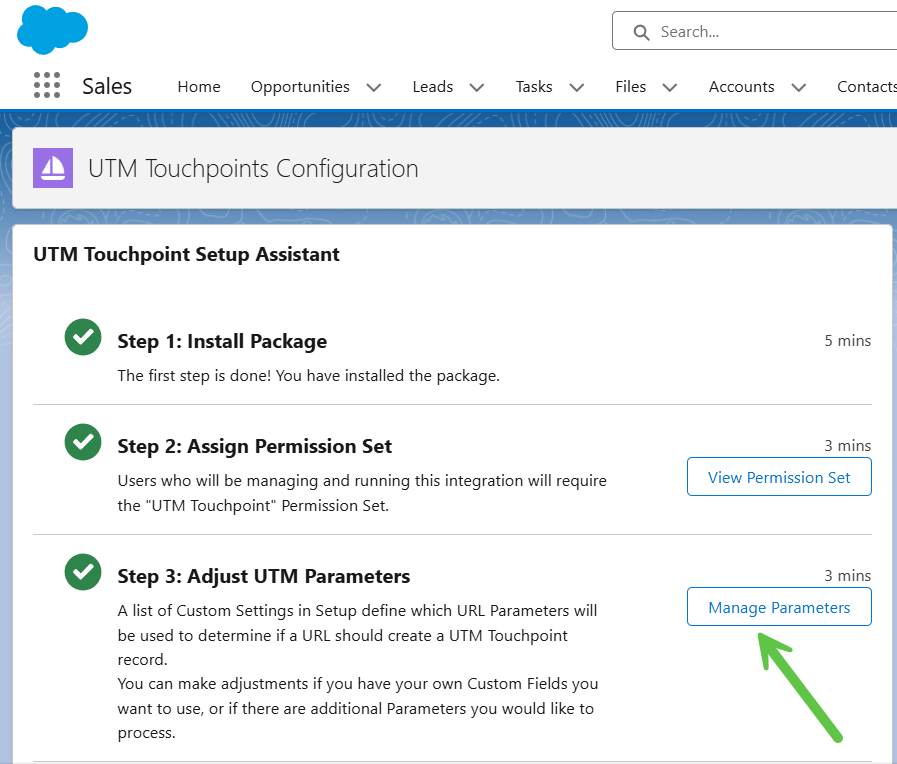
To get started, from the UTM Touchpoints Configuration screen, click on Manage Parameters. This will pop up a screen which allows you to make changes.
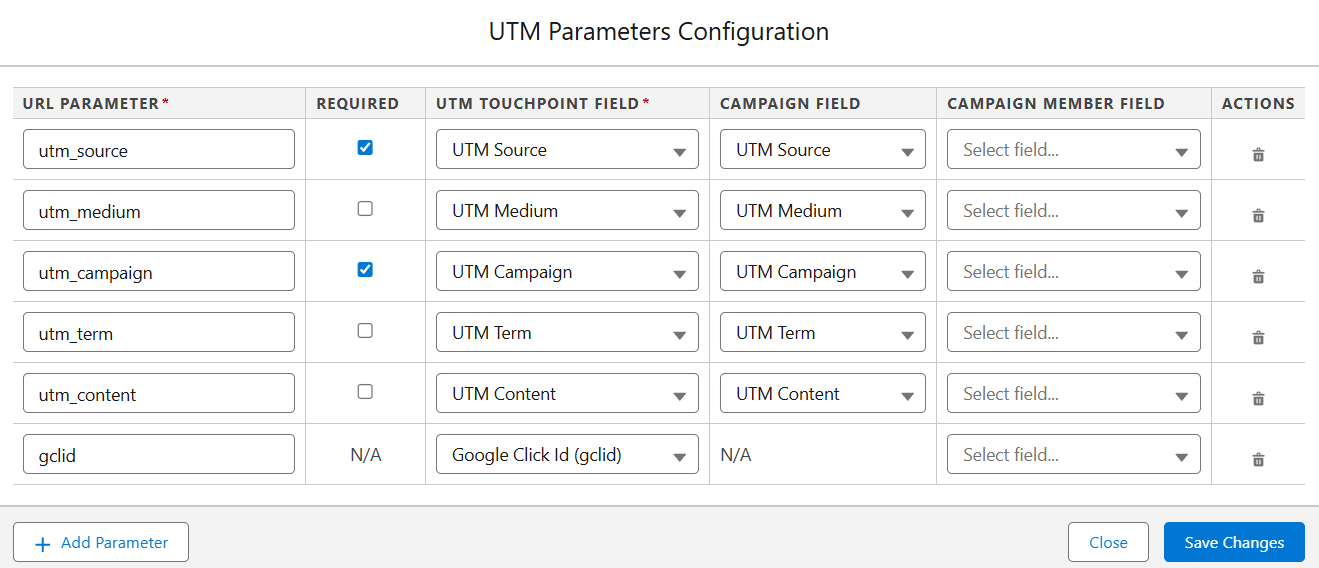
- URL Parameter: the name of the param.
- Required: whether this param is required when adding params to the Campaign
- UTM Touchpoint Field: the field on the cfl_utm__UTM_Touchpoint__c object that will store the value of this param.
- Campaign Field: (optional) used to match the Touchpoint to the Campaign.
- Recommended: ensure fields are added to the Page / Page Layout.
- Campaign Member Field: (optional) Allows the app to stamp Touchpoint values onto the CampaignMember record when it is created.
Once configured, you can add UTM Parameters to Campaign records, allowing UTM Touchpoint records to find the right Campaign.
If your Campaigns already have UTM fields defined, you can configure the app to use your own fields instead of those packaged with our solution.