How Campaign Matching Works
Each time a UTM Touchpoint is created, the app reads the UTM values from its URL and looks for the Salesforce Campaign that fits best. This page explains the rules, so you can design Campaigns that catch the traffic you expect.
The Rules
- Required parameters must match. A Campaign is only considered if its value for every required parameter equals the Touchpoint's value. Out of the box,
utm_sourceandutm_campaignare required. You can change this in Adjust UTM Parameters. - Everything the Campaign defines must match. If a Campaign has a value in any other UTM field, the Touchpoint must have that same value. A Campaign is ruled out as soon as one of its UTM fields differs from, or is missing in, the URL.
- Blank Campaign fields act as wildcards. A Campaign that leaves
UTM Contentblank will accept Touchpoints with any content value, or none. - An exact match always wins. If a Campaign defines exactly the same set of UTM values as the URL carries, it is chosen.
- Otherwise the app falls back to a broader Campaign: one whose defined values all match, even though the URL carries extra values the Campaign leaves blank.
If no Campaign qualifies, the Touchpoint is still saved and its Campaign field stays blank. You can find these later with the UTM Touchpoints Explorer.
Example
Using the default required parameters (utm_source and utm_campaign), here are three Campaigns that get progressively more specific. They can sit in a Campaign Hierarchy, but they don't have to.
| Name | UTM Source | UTM Medium | UTM Campaign | UTM Content |
| LinkedIn CPC | cpc | |||
| LinkedIn CPC - Winter Event 26 | cpc | winterevent26 | ||
| LinkedIn CPC - Snow Clearing 26 | cpc | winterevent26 | snowclearing |
Visit 1
https://www.acme.com/?utm_source=linkedin&utm_medium=cpc&utm_campaign=winterevent26
- LinkedIn: everything it defines matches, but the URL also carries a medium. A possible fallback, not an exact match.
- LinkedIn CPC: defines exactly the three values in the URL. Exact match, so this Campaign is chosen.
- Snow Clearing: defines a content value the URL doesn't have. Ruled out.
Visit 2
https://www.acme.com/?utm_source=linkedin&utm_medium=cpc&utm_campaign=fallevent26
- LinkedIn CPC and Snow Clearing are ruled out because the campaign is different.
- LinkedIn leaves campaign blank, so it accepts the visit. This Campaign is chosen.
Visit 3
https://www.acme.com/?utm_source=linkedin&utm_campaign=winterevent26
- There is no
utm_medium, and it is a required parameter. No Campaign is matched. The Touchpoint is saved with a blank Campaign.
This gives you a blend of broad pattern matching, so you don't need a Campaign for every UTM combination, with the option to be specific where it matters.
What happens after a match
When a Touchpoint has both a matched Campaign and a known Lead or Contact, the app can create a Campaign Member (if Create CampaignMember records is on in App-Wide Settings):
- The new Campaign Member's status is the Campaign's UTM Campaign Member Status, or the Campaign's default status if that field is blank.
- Is UTM Touchpoint is checked, and UTM Timestamp holds the time of the visit.
- If the person is already a member of that Campaign, no duplicate is created.
Touchpoints from visitors who are not yet a Lead or Contact are still stored and matched to a Campaign. They simply don't produce a Campaign Member.
Updating Existing CampaignMembers
If Allow updating existing Campaign Member Status is enabled, the app can move an existing member to a new status when they arrive through a matching link.
When a Touchpoint is processed:
- The app finds the best matching Campaign using the rules above.
- If there is no matching Campaign, or the Touchpoint has no Lead or Contact, processing stops.
- The app looks for an existing Campaign Member for that person on that Campaign.
- If one exists, the app checks the Campaign's UTM Overridable Campaign Member Statuses, a comma-separated list of statuses you allow to be replaced.
- If the member's current status is in that list, it is changed to the Campaign's UTM Campaign Member Status.
Both Campaign fields must be filled in for an update to happen. Spell the statuses exactly as they appear on the Campaign.
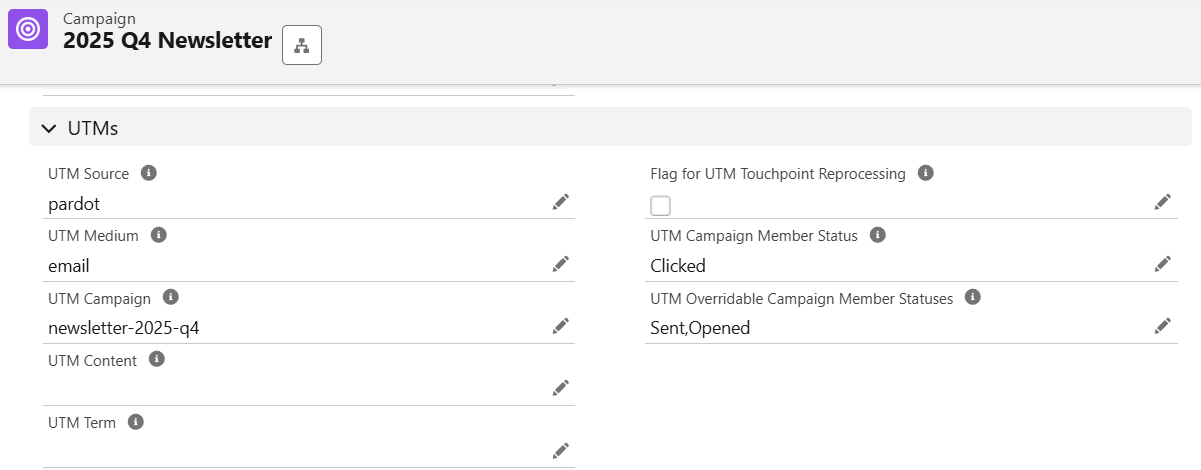
Example. You send a newsletter and add every recipient to its Campaign with the status Sent. On the Campaign you set:
- UTM Campaign Member Status:
Clicked - UTM Overridable Campaign Member Statuses:
Sent, Opened
Recipients who click a UTM-tagged link in the email move to Clicked. A recipient whose status is Unsubscribed stays Unsubscribed even if they click later, because that status isn't in the overridable list.