Salesforce Microsoft Teams Integration: The Complete Setup Guide
August 14, 2025
5 Ways to Send Salesforce Alerts to Microsoft Teams Without Code
August 30, 2025
How to Implement Multi-Touch Attribution in Salesforce
In marketing, it’s easy to fall into the trap of giving all the credit to the first or last campaign touch. A prospect clicks a couple of LinkedIn ads → later fills out a form → then takes a sales call. Which channel deserves the revenue credit? If you’re only measuring first-touch, LinkedIn looks like the hero. If you’re only measuring last-touch, the sales call wins. The truth, of course, is somewhere in the middle.
That’s the promise of multi-touch attribution (MTA): it distributes credit across all meaningful interactions that led to revenue.
Salesforce has the right ingredients to support this: Campaigns, Leads, Contacts, Opportunities, and Campaign Influence models... though out-of-the-box reporting rarely delivers the full story. That’s why marketers often feel stuck: the data exists, but connecting it into a complete influence model takes extra effort. Sometimes a ton of extra effort.
This article is the build order I'd follow. Campaign structure first, then touchpoint capture, then Contact Roles, then the attribution window, then QA. It's roughly two weeks of real work, and the order matters more than the speed. We'll cover what MTA actually means inside Salesforce, walk the implementation step by step, and get into why the whole thing matters once it's running.
What Multi-Touch Attribution Means in Salesforce
At a high level, attribution is about answering one question: which marketing activities contributed to a deal?
But in Salesforce, “multi-touch attribution” isn’t just a buzzword — it maps directly onto specific objects and relationships:
-
Touchpoint: the raw interaction, like a click on an ad with UTM parameters. These interactions are often buried in your Marketing Automation Platform.
-
Campaign: the Salesforce record that represents the marketing effort (webinar, ad set, email, tradeshow).
-
Campaign Member: the record that ties a Lead or Contact to a Campaign. This is where most touchpoints live once they’re in Salesforce.
- Contact: the Salesforce record that represents the person you are trying to market and sell to.
-
Opportunity Contact Role (OCR): the bridge between Contacts and Opportunities. Without OCRs, your campaigns can’t influence pipeline.
- Opportunity: details about the deal, includes the dollar amounts you are ultimately trying to attribute to campaigns.
-
Campaign Influence record: Salesforce’s object for “credit assignment” — it links Opportunities back to the Campaigns that influenced them.
Here’s the key: multi-touch attribution in Salesforce is the practice of ensuring every meaningful touchpoint (Campaign → Campaign Member → Contact → OCR → Opportunity) flows all the way through to an Influence record.
That’s what turns clicks and form fills into revenue credit.
It’s also what separates Salesforce attribution from Google Analytics: GA can tell you which channel drove the most sessions, but it has no concept of “this session eventually helped close a $100k opportunity.” Salesforce, done right, can.
Break any one of those links and the whole chain goes quiet. Not partially quiet, either. If an Opportunity has no Contact Roles, it cannot be reached by any model. First touch, last touch, even distribution, they all read from the same Contact Roles, so they're all equally blind to it. You don't get an error. The number just comes out smaller.
That's why the steps below are in the order they're in.
Implementing Multi-Touch Attribution in Salesforce (Step-by-Step)
This is the practical roadmap to move from "incomplete influence" to true multi-touch attribution. Six steps, in this order, because each one makes the next one measurable.
Step 1: Finalize Campaign Hierarchy & Naming
This is the least interesting step and the one that costs the most to skip. Every downstream report groups by Campaign, so if your names are inconsistent you'll be cleaning up in the reporting layer forever.
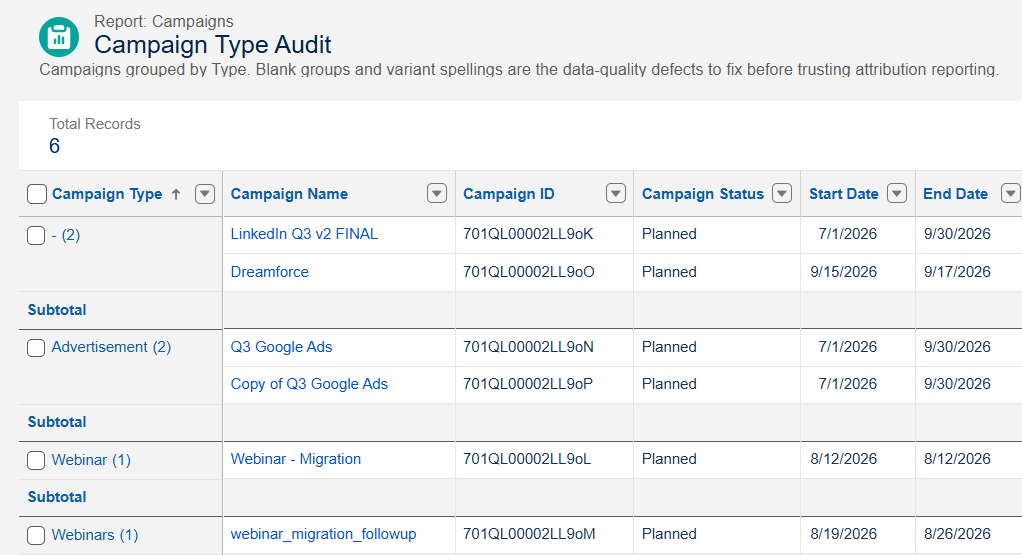
Inconsistent and messy data. Type and Name could be better
Decide three things:
- Your hierarchy. Parent campaigns for programs, child campaigns for tactics. Pick where Campaign Members get added, and it's almost always the tactic level. Roll up to the parent for program-level reporting.
- Your naming convention. Something parseable. 2026-Q3 | Paid Social | LinkedIn | Retargeting beats LinkedIn Q3 v2 FINAL.
- Your required fields. At minimum Type, Start Date, and whatever field you use for channel grouping.
Then enforce it with a validation rule on Campaign requiring Type and a naming pattern. Takes twenty minutes, saves you months.
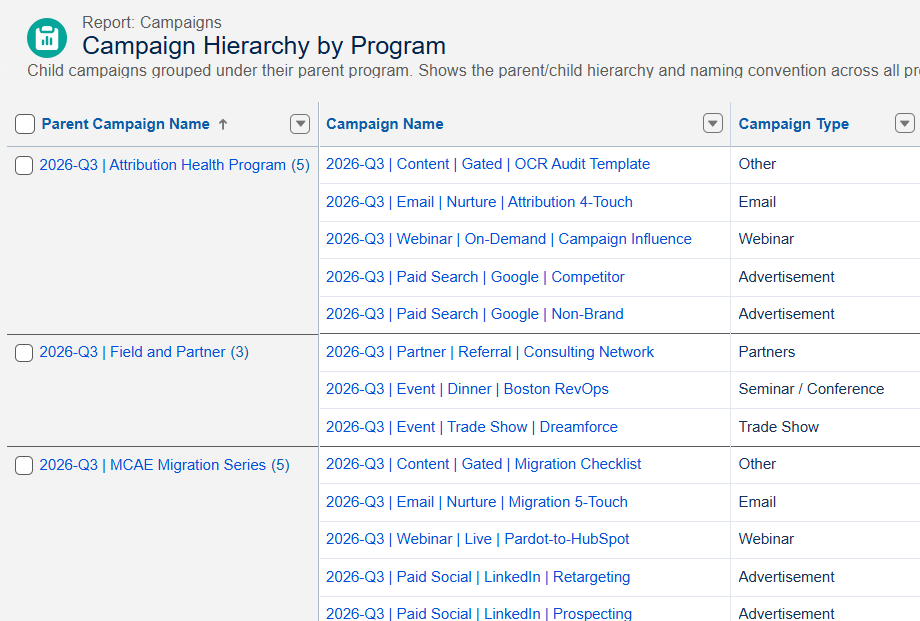
Three programs, thirteen tactics, one naming convention. Nothing to clean up in the reporting layer later.
Before moving on: run a report of Campaigns created in the last year, grouped by Type. If you see blanks, or three spellings of "Webinar", fix that now. It does not get easier once there are influence records pointing at them.
Step 2: Capture Every Touchpoint
Campaign Influence can only see campaigns that produced a Campaign Member. Every other interaction in the journey, the ad clicks, the organic visits, the retargeting, never enters Salesforce at all.
Most teams close that gap one of two ways.
Hidden fields with a JavaScript snippet will stamp UTM values onto the Lead at form submission. That works for first touch, and it's free. It also captures exactly one touch and usually overwrites whatever was there before, so the ad that introduced someone six weeks ago is gone. I went into where that breaks in hidden fields vs UTM touchpoints.
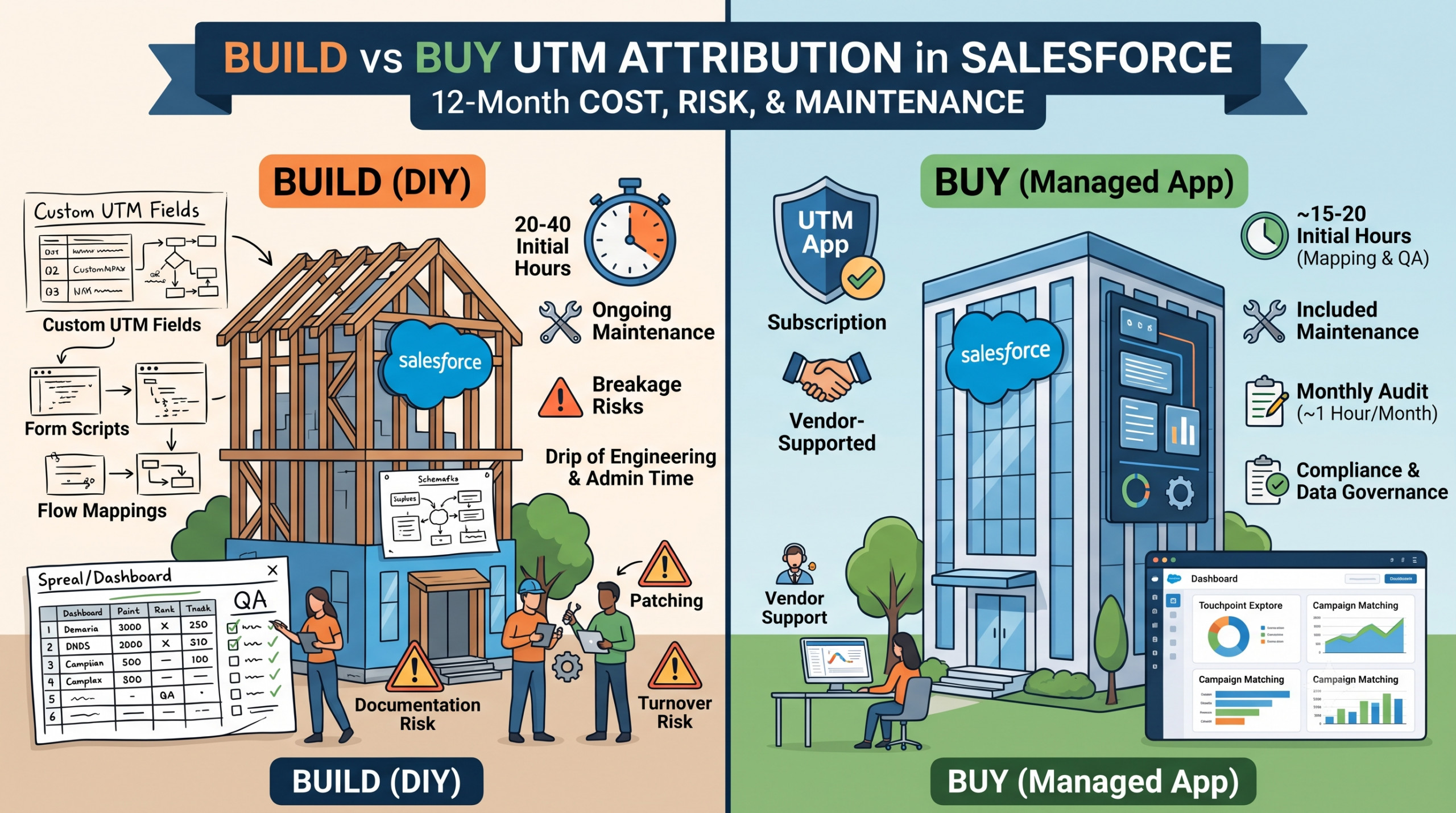
The alternative is storing each visit as its own durable record, matched to a Campaign, so nothing gets overwritten because nothing needs to be. That's what our UTM Capture & Reporting App does, and there's a fuller cost comparison in build vs buy if you're weighing it against building your own.
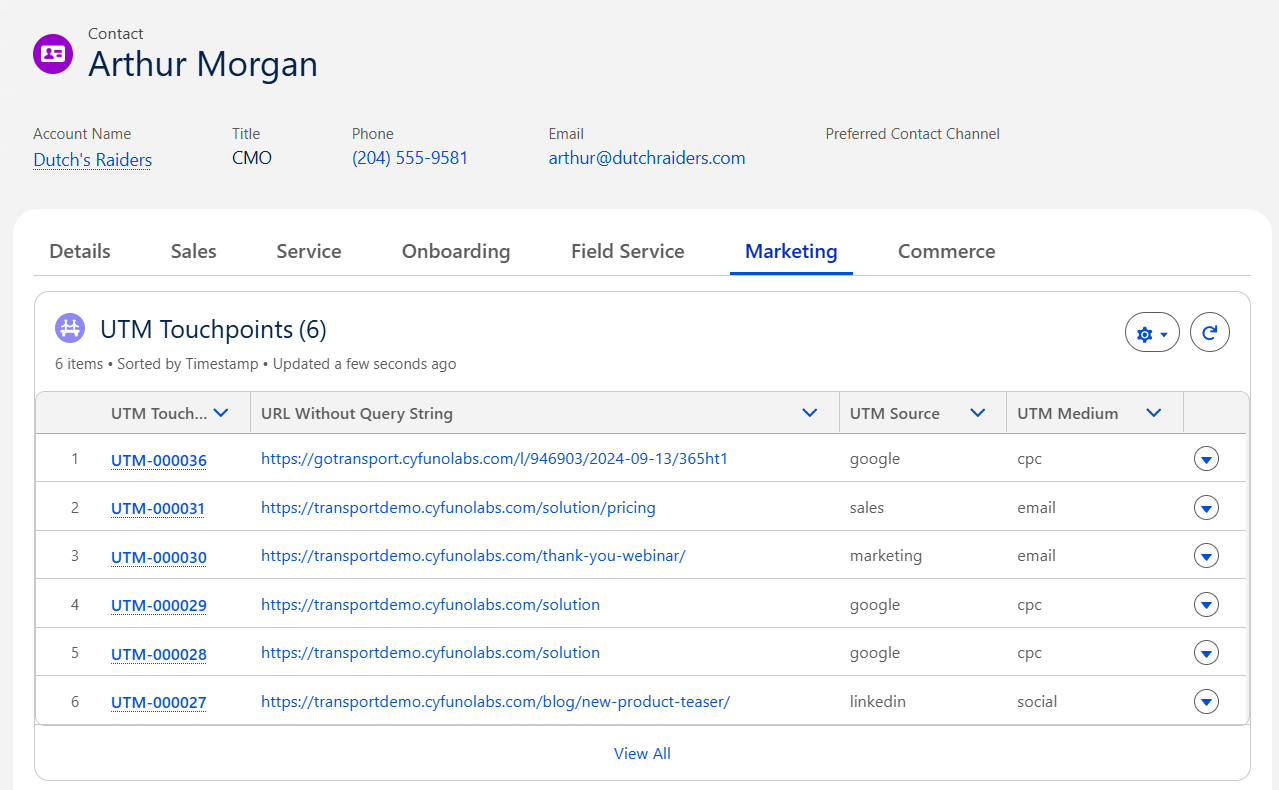
Six touchpoints on one Contact, each its own record. A hidden-field setup would show you one of these.
Either way, add UTM parameters to your key Campaign links and confirm the values match the naming convention you set in Step 1. Mismatches here are the number one source of unmatched data later.
Before moving on: pick five recent Opportunities and try to reconstruct their journey from Salesforce data alone. Whatever you can't see is what's missing from your reports.
Step 3: Enforce Opportunity Contact Roles (OCRs)
This is where most attribution projects quietly fail, so give it the most attention.
Measure it first. Build a report on the Opportunities with Contact Roles report type, then add a cross filter for Opportunities without Contact Roles to flip it around. Group by stage, owner, record type, and created month. The grouping is the whole point. An org-wide percentage tells you almost nothing, while the distribution tells you exactly where the process broke.
If you're comfortable in the Developer Console, this gets you the worst of it directly:
SELECT Id, Name, StageName, Amount, CloseDate, OwnerId
FROM Opportunity
WHERE CreatedDate = LAST_N_DAYS:180
AND Id NOT IN (SELECT OpportunityId FROM OpportunityContactRole)
ORDER BY Amount DESC
Sort by Amount rather than date, deliberately. If the gap lives in your small deals it's an annoyance. If your largest Opportunities are sitting at the top of that list, every number in your influence dashboard is understated exactly where it matters most.
Then fix the process, in this order:
Trim the Role picklist to four to six values that mean something in your business. A fifteen-value picklist guarantees inconsistent data.
Add a validation rule, gated on the right stage. Not at creation, because reps open Opportunities before they know the buying group and you'll get one placeholder role added to silence the rule and nothing after that. Not at close, because that's too late for the campaign touches that mattered. Gate it at the first stage that implies a real conversation.
One wrinkle: you can't write a validation rule against Contact Roles directly, and OpportunityContactRole doesn't support roll-up summary fields. The standard workaround is a Contact_Role_Count__c field on Opportunity, kept current by record-triggered Flows on OpportunityContactRole. You need an after-save Flow for create and update, and a before-delete Flow for the delete path. That delete path is the one most builds forget.
Then automate what's left. Align.ly Contact Role is a free AppExchange app that builds Contact Roles from Tasks, Events, and Campaign Members already on the record, and logs which rule fired for each one. That log matters more than it sounds like it should. "She attended the March webinar and we logged the follow-up call" survives a challenge from a sales leader. "He works at that Account" does not.
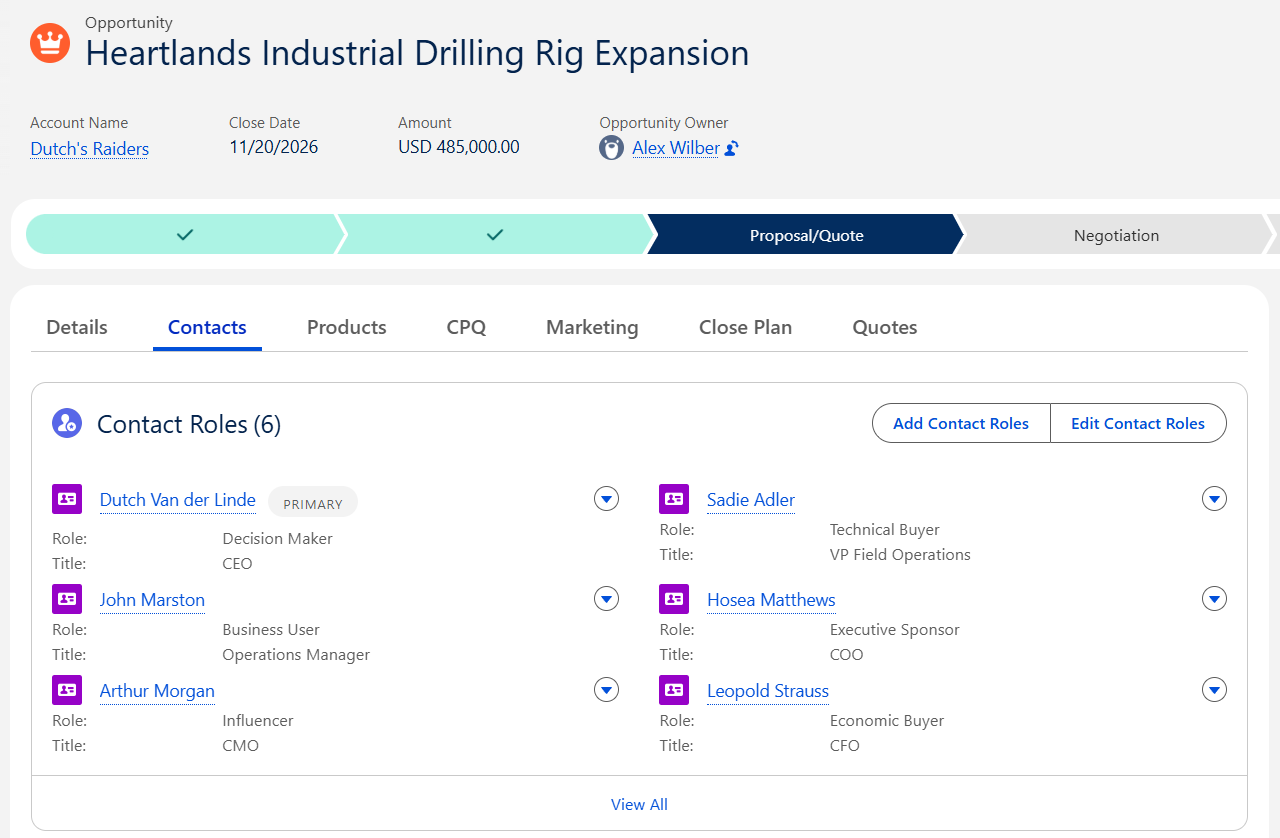
Six people, six distinct roles, one primary. With a single Contact Role, five of these six (and all their Campaign touchpoints) would be invisible to every influence model you run.
I went much deeper on all of this in the Opportunity Contact Roles post, including the failure patterns and a two-week remediation plan.
Before moving on: re-run the baseline report. You want to see the gap shrinking in your open pipeline, not just in aggregate.
Step 4: Configure Attribution Windows
Campaign Influence only credits campaigns whose member records fall inside a configured timeframe before the Opportunity was created. Check what yours is currently set to in Setup before you assume anything.
Two questions decide the right number.
How long is your actual sales cycle, measured rather than remembered? And how early in the journey do your first meaningful touches happen?
If your median cycle is nine months and your window is ninety days, you've defined most of your marketing out of existence. If your cycle is three weeks and your window is a year, you're crediting campaigns that had nothing to do with the deal.
Whatever you pick, document why. This is the number people will argue about later, and "we chose 180 days because our median cycle is 140" ends that argument faster than anything else you can say.
Before moving on: spot-check one long-cycle deal and one short-cycle deal. Do the campaigns you'd expect to see actually show up?
Step 5: QA & Backfill Historical Data
Resist the urge to present this the moment it produces output. You get one shot at credibility with a report like this.
Check four things:
- Coverage. What percentage of closed-won Opportunities have at least one Contact Role, and at least one influence record?
- Timing. How long after Opportunity creation does the first Contact Role appear? If the answer is thirty days, your roles are landing after the window that matters. This one gets skipped constantly and it's the metric attribution cares about most.
- Distribution. Does one channel have suspiciously round numbers, or suspiciously total dominance? That usually means a matching rule is too broad.
- The sniff test. Take three deals you personally know the story of. Does the report tell that story? This catches things no query will.
If you're backfilling historical touchpoints, do it before this QA pass rather than after, so you're checking the data you'll actually be presenting.
There's a longer version of this in the Campaign Influence QA checklist if you want something more systematic to work through.
Step 6: Train the Team & Publish an “Attribution Charter”
Create a one-pager describing which models you're running, what counts as influence, what the attribution window is and why, and how to read the outputs.
Then actually walk marketing, sales, and leadership through it. The goal is that the first time someone disagrees with a number, the conversation is about the business rather than about whether the report can be trusted.
This step gets dropped more than any other, and it's the reason attribution projects that technically work still fail politically.
Pacing this over two weeks
If it helps to see it as a schedule rather than a list:
Week one is plumbing. Campaign structure and naming, touchpoint capture in place, and your Contact Role baseline measured so you know what you're actually dealing with.
Week two is correction and proof. Ship the Contact Role validation rule to one team first, because the objections you hear from a pilot group are much cheaper than the ones you hear from the whole sales org. Set your window and write down the reasoning. Then QA, publish the charter, and re-baseline at the end so the before-and-after is captured while everyone still remembers why you did the work.
Two weeks is enough because most of this is decisions rather than build work. The build is genuinely small. Deciding who counts as a Contact Role in your business is the part that takes real time.
Why You Need Multi-Touch Attribution
Budget Optimization
Forecast Accuracy
Cross-Functional Alignment
Real-World Example
-
First-Touch says: “A LinkedIn Ad created this deal.”
-
Last-Touch says: “The SDR call created this deal.”
-
Multi-Touch says: “3 LinkedIn Ads created awareness, the nurture emails maintained engagement, the webinar secured interest, and the SDR call closed it.”
It’s not just more fair, it’s more accurate. And accuracy is what makes budgets, forecasts, and alignment work.
Salesforce Campaign Influence: The Starting Point
Salesforce isn’t blind to the attribution challenge. That’s why the Campaign Influence object exists. Out of the box, Salesforce provides four influence models you can turn on:
-
Primary Campaign Source: 100% credit goes to the campaign marked “Primary” on the Opportunity.
-
First-Touch: Credit goes to the first campaign a prospect engaged with.
-
Last-Touch: Credit goes to the most recent campaign before Opportunity creation.
-
Even Distribution: Credit is evenly split across all campaigns tied to Opportunity Contact Roles.
Strengths of Native Campaign Influence
-
Native integration: Works with standard Salesforce objects, no external system needed.
-
Multiple models at once: You can enable several models and compare results.
-
Scalable reporting: Influence records are generated automatically when Campaigns, Members, and OCRs are in place.
Limitations You’ll Hit Quickly
-
Incomplete data: If Campaign Members or OCRs aren’t consistently created, your influence model breaks down.
-
Rigid models: Salesforce only provides the four models above (with items 2-4 only to those with Account Engagement) no U-shaped, W-shaped, or time-decay without customization.
-
No touchpoint granularity: Out-of-the-box, you can’t easily see every click and visit that led to a deal, only the Campaigns that got tied in.
Where Attribution Breaks Down
Missing Campaign Members
Marketers sometimes forget (or don’t have automations) to add people to Campaigns. If a prospect attends your webinar but never becomes a Campaign Member, that touchpoint never gets credit.
UTM Parameters are often used to try to gather this information, but they often die at the first form submission. You might capture one of the channel touchpoints that generated the initial lead, but every other ad click, nurture email, or remarketing visit likely disappears. Without those touchpoints, attribution looks more like a guessing game than a data driven approach.
No Opportunity Contact Roles (OCRs)
This is the single biggest reason attribution fails. If Opportunities don’t have Contacts tied as OCRs, Salesforce can’t link Campaigns to revenue. A closed deal might have five Campaigns influencing the buyer, and without OCRs, those Campaigns never show up.
Having at least 1 Contact as an OCR will spread that Opportunity's revenue across Campaigns, though for a more complete picture you'll want to try to connect all relevant Contacts.
Delayed or Manual Processes
Some Campaign Member associations or OCR assignments happen days later (if at all). Since Campaign Influence is time-bound (it only credits Campaigns created within a certain attribution window), late entries often mean lost credit.
Bottom line: Salesforce attribution doesn’t fail because the models are wrong. It fails because the data feeding those models is incomplete or inconsistent.
Capturing Every Touchpoint with UTMs
Why Hidden Fields and DIY Scripts Aren’t Enough
How our UTM Capture & Reporting App Solves This
Our UTM Capture & Reporting App is designed to persist every visit:
-
Durable Storage: UTMs are stored across sessions in your Salesforce org, not lost after one form.
-
Campaign Mapping: Each touchpoint is automatically matched to the right Salesforce Campaign.
-
Custom Object: Touchpoints live as first-class records in Salesforce, not trapped in Google Analytics or spreadsheets.
-
Account Engagement Integration: Those touchpoints can power scoring, segmentation, and automation in Pardot/MCAE.
Now, instead of seeing:
-
“First Touch: LinkedIn Ad”
-
“Latest Touch: Google Search”
…you’ll see:
-
LinkedIn Ad → Blog Visit → Retargeting Display → Webinar Signup → Nurture Email → Google Search → SDR Call.
Every touchpoint becomes visible, attributable, and reportable.
Example: Unmatched UTMs
Not every click matches a Campaign right away — and that’s okay. Our app queues unmatched UTMs so you can review them and either link to an existing Campaign or create a new one. This not only fixes attribution but also exposes gaps in your Campaign taxonomy.
Why it Matters
This is what transforms Salesforce from a system that only shows “beginning and end” into one that tells the full story of every deal. Once you have that data, Campaign Influence reporting suddenly becomes useful — because it’s backed by complete, accurate touchpoints.
Choosing the Right Attribution Model
With Campaigns structured and touchpoints captured, the next question is: how do we assign credit? That’s where attribution models come in.
-
First-Touch: 100% credit to the first campaign interaction.
-
Last-Touch: 100% credit to the most recent interaction before Opportunity creation.
-
Even Distribution: Credit evenly split across all influencing Campaigns.
-
Primary Campaign Source: The Campaign marked as “primary” gets all credit.
Most real-world journeys aren’t captured well by the four standard models. That’s why advanced teams layer on:
-
U-Shaped: Heavier credit to first and last touches, lighter for middle touches.
-
W-Shaped: Adds significant weight to the “opportunity creation” touch in the middle.
-
Time-Decay: Recent touches get more credit than older ones.
When to Use Which
-
First-Touch: Best for evaluating lead generation channels (top of funnel).
-
Last-Touch: Useful for analyzing conversion drivers (bottom of funnel).
-
Even Distribution: Works well when every touch is considered equally valuable.
-
U-/W-Shaped: Ideal for complex B2B journeys where multiple touches matter but bookends are key.
-
Time-Decay: Strong fit for long sales cycles where recency drives action.
Example: Same Deal, Different Models
Scenario: A deal touches LinkedIn Ad → Webinar → Email Nurture → SDR Call → Pricing Page.
-
First-Touch: 100% credit to LinkedIn Ad.
-
Last-Touch: 100% credit to Pricing Page.
-
Even: 20% credit to each of the five touches.
-
W-Shaped: 30% LinkedIn, 30% SDR Call, 30% Pricing Page, 10% spread across others.
Different models tell different stories, that’s the whole point. The right model depends on your goals, cycle length, and buying process.
Measuring Attribution with Dashboards
Once your plumbing is in place, reporting is where the payoff happens. That’s where our Campaign Influence Accelerator comes in.
Model Comparison Dashboard
-
Shows First-Touch, Last-Touch, Even, and Primary Campaign Source side by side.
-
Quickly reveals when a single model is over-crediting a channel.
-
Example: Paid Search looks unbeatable in First-Touch but drops in Even Distribution, showing its role is often as an opener, not a closer.
Example Dashboard
-
A storytelling dashboard showing how touches roll up from Campaigns → Opportunities → Revenue.
-
Designed to be customized with your hierarchy, so you can present attribution to leadership in a clean, digestible way.
Troubleshooting Dashboard
-
Diagnostic view of your attribution health:
-
% Opportunities with OCRs
-
% Opportunities with Influence records
-
% Campaigns with Campaign Members but no Influence
-
-
These ratios expose where your data pipeline is breaking down.
-
Example: If 40% of Opportunities have no OCRs, you know attribution is incomplete — fix the process, not the model.
KPI Guardrails
Benchmarks to measure your progress:
-
90%+ of Opportunities should have ≥1 OCR.
-
70–85%+ of Campaigns should have Campaign Members.
-
Median touches to first meeting — baseline and improve.
-
Cost per influenced Opportunity — track trends over time.
The Accelerator turns attribution from a black box into something you can see, measure, and improve.
Common Pitfalls & Fixes
Even with the right setup, most teams run into the same issues. The good news: they’re all solvable.
No OCRs on Closed Won Opportunities
-
Problem: Campaigns can’t be linked without OCRs.
-
Fix: Add validation rules that require ≥1 OCR before an Opportunity can move to Closed Won. Build automation to suggest OCRs from recent Contacts.
- Apps: There's a fantastic free AppExchange app that can automatically create Opportunity Contact Roles for your Opportunities. Never as precise as a Salesperson adding them, but maybe a bit more reliable!
UTMs That Don’t Match Campaigns
-
Problem: A click comes in with UTMs but doesn’t align to any existing Campaign, so it’s ignored.
-
Fix: Use the “Unmatched UTMs” reports in the UTM app. Review weekly, create or map Campaigns as needed. This doubles as a campaign hygiene process.
Inflated “Direct” or “Other”
-
Problem: Users bypass tagged links or teams forget to build UTMs, so traffic gets lumped into “Direct.”
-
Fix: Enforce link policies with a URL builder (included in the UTM app), and train teams to never share raw URLs.
Broken Attribution Windows
-
Problem: A Campaign Member is added too late, outside the 90-day attribution window, and loses credit.
-
Fix: Align SLAs so Campaign Members are created automatically and quickly. Adjust attribution windows if your sales cycle is unusually long.
Parent vs. Child Credit Confusion
-
Problem: Credit is assigned inconsistently between parent (program-level) and child (tactic-level) Campaigns.
-
Fix: Standardize where Campaign Members should be added (usually at the tactic level), and use roll-up reporting for program-level insight.
Conclusion & Next Steps
Multi-touch attribution in Salesforce isn't a luxury anymore. It's the difference between guessing which campaigns work and proving it with data tied to revenue.
Salesforce gives you the foundation with Campaign Influence, but without consistent Campaign Members, OCRs, and UTM capture, the models don't tell the full story. That's why investing a small amount of time in building the right plumbing (Campaign structure, data capture, automation) pays off so heavily in accurate reporting.
With the right setup, you can:
- Show the real ROI of your marketing spend.
- Align sales, marketing, and finance on a single source of truth.
- Optimize future campaigns based on data that leadership actually trusts.
Ready to put this into action? If you want one thing to do today, run the Contact Role query from Step 3 against your last six months and sort by Amount. It takes five minutes and tells you immediately whether you have a plumbing problem or a model problem.
Then work the steps in order.
Learn more about the UTM Capture & Reporting App for capturing every touchpoint, and install the free Campaign Influence Accelerator to measure attribution health and compare models.
With these two in place, you'll not only understand what multi-touch attribution is, you'll actually be running it, inside Salesforce, in weeks not months.